
Dates and start times
Moving days, bundle days, short-notice waitlist, fully booked days and start-time slots.
In step 5 of the booking form the client picks a moving date from a calendar and a preferred start time. The calendar only offers days you can actually do, and marks the days that save them money or need a little patience.
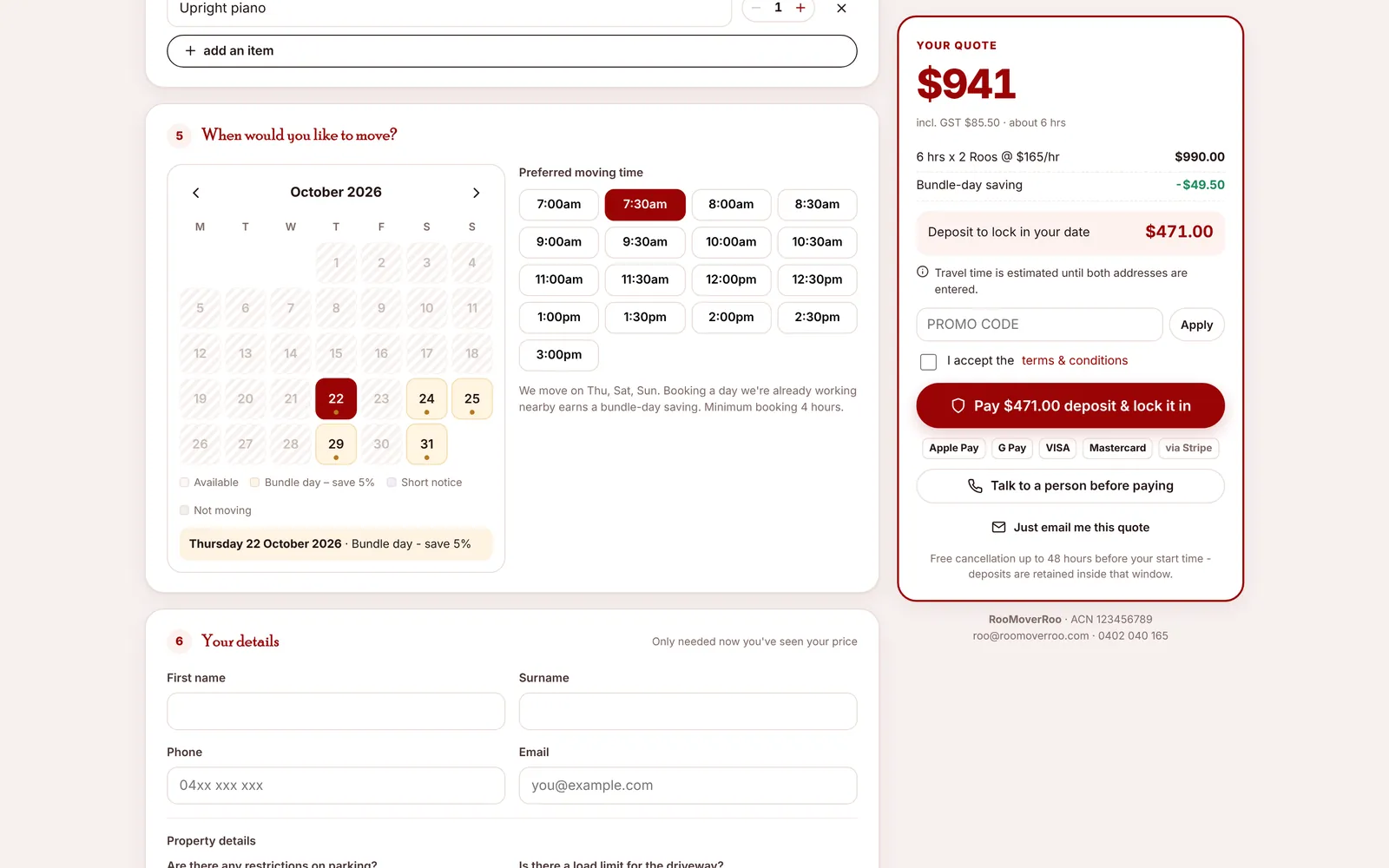
What the calendar shows#
| Day looks like | Label | Means |
|---|---|---|
| Plain, clickable | Available | A moving day with room for another job. |
| Highlighted | Bundle day – save 5% | A moving day that already has a job booked. The client gets the bundle-day saving. |
| Marked | Short notice | Too close to review in time. They can still book, onto the short-notice waitlist. |
| Greyed and hatched | Not moving | Not one of your moving days, already full, or in the past. |
Picking a day shows it in words underneath, with the reason if there is one, for example “Thursday 22 October 2026 · Bundle day – save 5%”. Clients can book up to 120 days ahead.
The rules behind it#
All of these are in Settings, Booking rules:
- Moving days: only the weekdays you choose are bookable. Thursday, Saturday and Sunday by default.
- Max jobs per day: when a day has this many jobs (3 by default), it’s fully booked. Cancelled and waitlisted jobs don’t count.
- Bundle days: a day with at least one job (and room for more) gives the Bundle-day discount % (5% by default) to help you cluster jobs.
- Short notice: the office needs each job by the review deadline, 8 pm two days before by default. A Saturday move must be booked by Thursday 8 pm. After that the day shows as short notice.
- Booking horizon: how many days ahead the calendar goes.
Short-notice bookings#
When a client picks a short-notice day, the form explains: “Short-notice date: our booking team needs a little time to arrange a crew. You can still book – we’ll confirm as soon as a crew is free, or refund your deposit in full.”
If they pay the deposit, the job is created as Waitlist and appears on the review queue’s Short-notice waitlist tab, and the office email is flagged “SHORT NOTICE”. If a crew can be found, for example after a cancellation, the office approves it like any other job. If not, cancel it from the job record and the deposit is refunded.
Start times#
Preferred moving time lists start times every 30 minutes from 7:00am to 3:00pm (the first and last start times are set in Booking rules). The start time also matters for travel: with Google Maps connected, the drive is priced for that date and time, with traffic.
Below the times the form reminds the client: “We move on Thu, Sat, Sun. Booking a day we’re already working nearby earns a bundle-day saving. Minimum booking 4 hours.”
Is a date needed?#
| Client chooses | Date needed? |
|---|---|
| Pay deposit | Yes |
| Talk to a person before paying | Yes |
| Just email me this quote | No. They can add one later by asking you to edit the quote. |
The app checks the date again when the client submits. If someone else has just filled the day, or it’s no longer bookable, they’re asked to pick another date.
Where you see the same rules#
The office Schedule uses the same rules: non-moving days are hatched, each day shows how full it is, and the selected day says when it’s a bundle day.